












DockSec is an OWASP Incubator Project that bridges the gap between complex security scan results and actionable developer fixes. It integrates industry-standard scanners (Trivy, Hadolint, Docker Scout) with advanced AI to provide context-aware security analysis.
Instead of overwhelming you with a list of 200+ CVEs, DockSec:
- Prioritizes what actually affects your specific container setup.
- Explains vulnerabilities in plain English, not just security jargon.
- Suggests specific, line-by-line fixes for your Dockerfile.
- Generates professional, interactive security reports for your team.
Think of it as having a security expert sitting right next to you, reviewing your Dockerfiles in real-time.
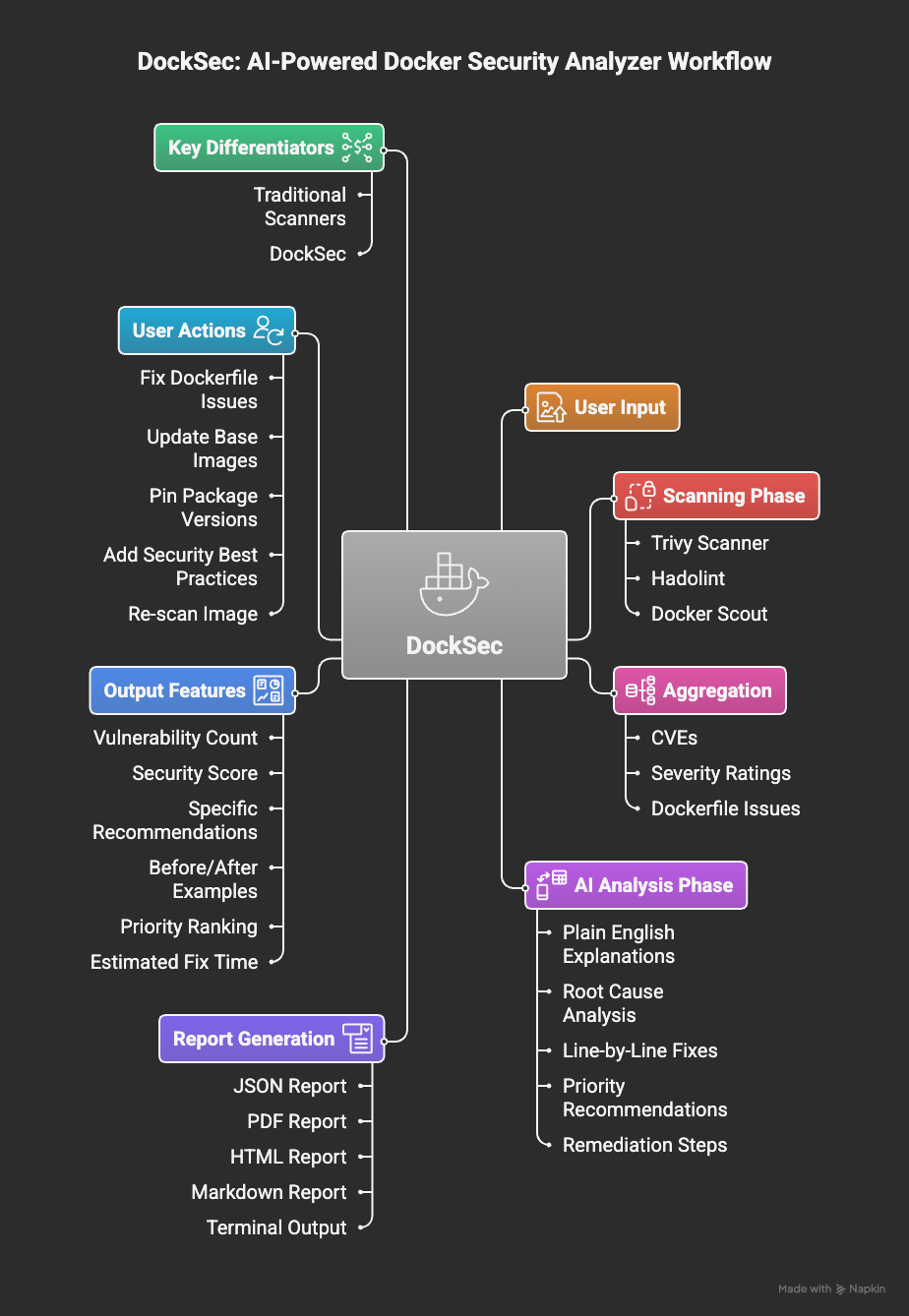
DockSec workflow: From scanning to actionable insights
DockSec follows a robust four-stage pipeline:
- Scan: Runs Trivy, Hadolint, and Docker Scout locally on your environment.
- Analyze: AI correlates findings across all scanners to remove noise and assess real-world impact.
- Recommend: Generates human-readable explanations and specific remediation steps.
- Report: Exports actionable results in JSON, PDF, HTML, or Markdown formats.
DockSec is led by a dedicated team committed to making container security accessible.
- Advait Patel - Project Lead
For questions or discussions, please join the #project-docksec channel on OWASP Slack.
Integrate DockSec into your GitHub Actions workflow:
- name: Run DockSec AI Scanner
  uses: OWASP/DockSec@main
  with:
    dockerfile: 'Dockerfile'
openai_api_key: ${{ secrets.OPENAI_API_KEY }}# Install DockSec
pip install docksec
# Scan a Dockerfile (AI-powered)
# Reports will be saved to ~/.docksec/results/
docksec Dockerfile
# Scan Dockerfile + Docker image
docksec Dockerfile -i myapp:latest
# Scan only a Docker image
docksec --image-only -i myapp:latest
# Fast scan only (no AI)
docksec Dockerfile --scan-only- Smart Analysis: AI explains what vulnerabilities mean for your specific setup.
- Multi-LLM Support: Use OpenAI, Anthropic Claude (4.x), Google Gemini (1.5+), or local models via Ollama.
- Deep Integration: Combines Trivy (vulnerabilities), Hadolint (linting), and Docker Scout.
- Security Scoring: Get a 0-100 score to track your security posture over time.
- Centralized Reporting: All reports are neatly organized in
~/.docksec/results/by default. - Rich Formats: Professional exports in HTML (interactive), PDF, JSON, and CSV.
- CI/CD Ready: Designed for easy integration into GitHub Actions and build pipelines.
- GitHub Action: Available on the GitHub Marketplace for automated security scans.
DockSec thrives on community contributions. Whether you are a developer, designer, or security enthusiast, there are many ways to get involved:
- Code Contributions: Fix bugs or add new features.
- Documentation: Improve guides or create tutorials.
- Issue Reporting: Identify and report bugs.
- Feedback: Share your experience and suggestions.
To get started, check out our Contributing Guidelines, Code of Conduct, and Sponsorship Guide.
- OWASP Project Page: owasp.org/DockSec/
- OWASP Slack: #project-docksec
- PyPI: pypi.org/project/docksec/
- Issues: Report a bug
Built with ❤️ by Advait Patel and the OWASP community.